



When using the Check In/Out feature, once you have checked in/out of your shift, this now displays ‘Recorded From/To’ instead of ‘Checked In/Out At’ to align with how this appears in the Web App.
If you wish to update your Recorded Time to better reflect the actual time you worked, select ‘Edit Recorded Time’ to do so. The edited recorded time will then be displayed in the Mobile App and the Web App.

The Activity Sign Off Workflow feature is now available from the Reports menu and provides:
-
Comprehensive Activity Review: View Clients, Staff Shifts, Client Journals, and Funding Allocations in one consolidated interface.
-
Activity Sign Off in Bulk: Save time by signing off multiple Activities at once.
-
Error Reduction: Activity replication settings are bypassed during bulk Sign Off, minimising unintended changes.
-
‘Under Review’ Error Handling: Activities that can’t be signed off due to missing or invalid data are automatically tagged as ‘Under Review’ to assist in identifying these.
A detailed article can be viewed here, or to watch a walkthrough video of this new functionality please click here.
We’d love to hear from you—your feedback on this new feature will help us shape it into something that truly works for you.
Continued rollout of the Date Picker across the Web App
The Date Picker used in the SupportAbility Web App is being updated across the platform to a more modern design.
In this release, the new Date Picker has been included in the following screens:
-
Client Search
-
Staff Account Search
-
Activity Search
-
All tabs in a Staff Account
In the coming releases, the new Date Picker will continue to be rolled out in more places in the Web App.
View Agreed Hours and assess Potential Overtime risks to more easily identify the best match when filling Staff Shifts
Further to the updates in the last release, the ‘Change Staff Member’ modal has been expanded upon and now displays the Staff Members’ total ‘Agreed Hours’ and ‘Potential Overtime’ risk for their Agreed Period, i.e. Week or Fortnight, both inclusive of the selected Staff Shift, within the Pay Period.
It is important to note that data will only be displayed in these new columns once the Pay Period has been configured.
These columns have been added to further assist rostering teams, managers, and team leaders in better understanding which Staff Members are the most suitable to fill the Shift.
For more information, please review the articles:
Roll out of a new Date Picker across the Web App
The Date Picker used in the SupportAbility Web App is being updated across the platform to a more modern design.
In this release, the new Date Picker has been included in the following screens:
-
Client Funding → Add Client Funding modal
-
Client → Client Service Participation
-
Client Search → From/To filters
-
Staff Search → From/To filters
-
AIR Incident → Date of Incident
The new Date Picker will be introduced in more places in the Web App in the coming releases.
View Rostered, Recorded and Finalised Shift and Kms details on the Mobile App
View Rostered, Recorded (inc. Check In/Out time stamps where relevant) and Finalised Shift and Kms details when using the Mobile App via the new ‘View Time and Kms’ button.
This replaces the ‘Edit Recorded Time’ button in a Staff Shift after the Shift Sign Off or the Activity Sign Off has been completed.
Configure your organisation’s Pay Period for improved Staff matching
Help the rostering team select the most suitable Staff Member by configuring your organisation’s Pay Period to display accurate ‘Agreed Hours’ and ‘Potential Overtime’ when updating Staff Shifts.
It is important to note that the Agreed Hours and Potential Overtime will not be displayed in the ‘Change Staff Member’ modal in Staff Shifts in Activities until the next release.
However, we encourage providers to configure their Pay Period in readiness for this to ensure this information is displayed following this release.
Please see the Configuring the Pay Period for your organisation article for more information.
Easily identify the most suitable Staff Members to fill Staff Shifts in Activities
Staff with the privileges required to manage Activities will notice that the ‘Change Staff Member’ modal (previously named ‘Change Activity Staff’) looks different with this release when either filling ‘To Be Filled’ Staff Shifts or changing a Staff Member in a Shift.
While this is a work in progress, these changes aim to assist rostering teams, managers, and team leaders in better understanding which staff are available and the most suitable to fill the shift.
In coming releases, this will be expanded to encompass Agreed Hours and Potential Overtime in the pay period (see below). We hope these ongoing changes are beneficial, and we welcome your feedback via support.
Please see the How to Change a Staff Member in a Staff Shift article for more information.
Security updates for increased data protection
For increased data protection, the upgrade to SupportAbility Web App version 8.12 and Mobile App version 1.7 includes the following security updates:
-
Minimum password requirements: This is now at least 8 characters, and passwords must contain at least 2 of the following: Upper-Case Letter, Lower-Case Letter, Number, and/or Special Character.
-
Web App login: Users are now logged out after a maximum of 30 minutes of inactivity. Please note that this can be configured to less than 30 minutes, as per your organisation’s preferences.
-
Mobile App PIN: Users are required to re-enter their PIN after 1 minute of inactivity
If your organisation does not currently adhere to the above minimum password requirements, staff will be prompted to change their password upon logging in to SupportAbility following this upgrade.
Please see this section of the Managing Password Security and this section of the Logging into SupportAbility article for more information.
The word that populates in the ‘Tracking Name 1′ column of the Xero Direct Invoice Batch export can now be configured for providers using the Xero finance system when Job Codes are in use. This was previously hard-coded to ‘SupportAbility’ and is now the current default value.
If your organisation would like this to be configured to something other than ‘SupportAbility’, e.g., ‘Location’, please let us know via support@supportability.com.au, and we can configure this for your organisation.
Staff Shifts – ‘Recorded From/To’ is displayed from m1.8.0 instead of ‘Checked In/Out’ in the Mobile App to align with how this is displayed in the Web App.
Important – while this update is being published on the evening of the 14th of April, 2025, it may take a few days for SupportAbility m1.8.0 to be made available by the App Stores.
When using the Check In/Out feature, once you have checked in/out of your shift, this now displays ‘Recorded From/To’ instead of ‘Checked In/Out At’ to align with how this appears in the Web App.
If you wish to update your Recorded Time to better reflect the actual time you worked, select ‘Edit Recorded Time’ to do so. The edited recorded time will then be displayed in the Mobile App and the Web App.
We’re excited to introduce the Activity Sign Off Workflow designed to streamline the review and approval of Activities for invoicing, claiming, and payroll.
The Activity Sign Off Workflow feature is now available from the Reports menu and provides:
-
Comprehensive Activity Review: View Clients, Staff Shifts, Client Journals, and Funding Allocations in one consolidated interface.
-
Activity Sign Off in Bulk: Save time by signing off multiple Activities at once.
-
Error Reduction: Activity replication settings are bypassed during bulk Sign Off, minimising unintended changes.
-
‘Under Review’ Error Handling: Activities that can’t be signed off due to missing or invalid data are automatically tagged as ‘Under Review’ to assist in identifying these.
A detailed article can be viewed here, or to watch a walkthrough video of this new functionality please click here.
We’d love to hear from you—your feedback on this new feature will help us shape it into something that truly works for you.
-
View Agreed Hours and assess Potential Overtime risks to more easily identify the best match when filling Staff Shifts
- Continued rollout of a new Date Picker in the Web App
View Agreed Hours and assess Potential Overtime risks to more easily identify the best match when filling Staff Shifts
Further to the updates in the last release, the ‘Change Staff Member’ modal has been expanded upon and now displays the Staff Members’ total ‘Agreed Hours’ and ‘Potential Overtime’ risk for their Agreed Period, i.e. Week or Fortnight, both inclusive of the selected Staff Shift, within the Pay Period.
It is important to note that data will only be displayed in these new columns once the Pay Period has been configured.
These columns have been added to further assist rostering teams, managers, and team leaders in better understanding which Staff Members are the most suitable to fill the Shift.
For more information, please review the articles:
Continued rollout of the Date Picker across the Web App
The Date Picker used in the SupportAbility Web App is being updated across the platform to a more modern design.
In this release, the new Date Picker has been included in the following screens:
-
Client Search
-
Staff Account Search
-
Activity Search
-
All tabs in a Staff Account
In the coming releases, the new Date Picker will continue to be rolled out in more places in the Web App.
- Security updates for increased data protection
- Easily identify the most suitable Staff Members to fill Staff Shifts in Activities
- Configure your organisation’s Pay Period for improved Staff matching
- View Rostered, Recorded and Finalised Shift and Kms details on the Mobile App
Security updates for increased data protection
For increased data protection, the upgrade to SupportAbility Web App version 8.12 and Mobile App version 1.7 includes the following security updates:
-
Minimum password requirements: This is now at least 8 characters, and passwords must contain at least 2 of the following: Upper-Case Letter, Lower-Case Letter, Number, and/or Special Character.
-
Web App login: Users are now logged out after a maximum of 30 minutes of inactivity. Please note that this can be configured to less than 30 minutes, as per your organisation’s preferences.
-
Mobile App PIN: Users are required to re-enter their PIN after 1 minute of inactivity
If your organisation does not currently adhere to the above minimum password requirements, staff will be prompted to change their password upon logging in to SupportAbility following this upgrade.
Please see this section of the Managing Password Security and this section of the Logging into SupportAbility article for more information.
Easily identify the most suitable Staff Members to fill Staff Shifts in Activities
Staff with the privileges required to manage Activities will notice that the ‘Change Staff Member’ modal (previously named ‘Change Activity Staff’) looks different with this release when either filling ‘To Be Filled’ Staff Shifts or changing a Staff Member in a Shift.
While this is a work in progress, these changes aim to assist rostering teams, managers, and team leaders in better understanding which staff are available and the most suitable to fill the shift.
In coming releases, this will be expanded to encompass Agreed Hours and Potential Overtime in the pay period (see below). We hope these ongoing changes are beneficial, and we welcome your feedback via support.
Please see the How to Change a Staff Member in a Staff Shift article for more information.
Configure your organisation’s Pay Period for improved Staff matching
Help the rostering team select the most suitable Staff Member by configuring your organisation’s Pay Period to display accurate ‘Agreed Hours’ and ‘Potential Overtime’ when updating Staff Shifts.
It is important to note that the Agreed Hours and Potential Overtime will not be displayed in the ‘Change Staff Member’ modal in Staff Shifts in Activities until the next release.
However, we encourage providers to configure their Pay Period in readiness for this to ensure this information is displayed following this release.
Please see the Configuring the Pay Period for your organisation article for more information.
View Rostered, Recorded and Finalised Shift and Kms details on the Mobile App
View Rostered, Recorded (inc. Check In/Out time stamps where relevant) and Finalised Shift and Kms details when using the Mobile App via the new ‘View Time and Kms’ button.
This replaces the ‘Edit Recorded Time’ button in a Staff Shift after the Shift Sign Off or the Activity Sign Off has been completed.
Roll out of a new Date Picker across the Web App
The Date Picker used in the SupportAbility Web App is being updated across the platform to a more modern design.
In this release, the new Date Picker has been included in the following screens:
-
Client Funding → Add Client Funding modal
-
Client → Client Service Participation
-
Client Search → From/To filters
-
Staff Search → From/To filters
-
AIR Incident → Date of Incident
The new Date Picker will be introduced in more places in the Web App in the coming releases.
- The 2024/25 NDIS Pricing Arrangements and Price Limits v1.3 – effective 1 Oct 2024, has been added to SupportAbility
- Employment Type badges and a new Quick Search have been added to the ‘Change Activity Staff’ window in Activities
- ‘Working Hours’ has been updated to ‘Agreed Hours’ in the HR tab of the Staff Account and other places
- Update to the minimum browser versions now required to run the SupportAbility Web App optimally
The 2024/25 NDIS Pricing Arrangements and Price Limits v1.3 – effective 1 Oct 2024, has been added to SupportAbility.
This includes the addition of 23 new Intensive and Complex Behaviour Support Items, and 35 Legacy Support Items have been removed.
Please see the NDIS Pricing Arrangements and Price Limit Updates – 2024/25 article for more information.
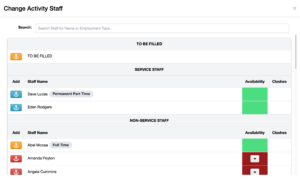
Employment Type badges and a new Quick Search have been added to the ‘Change Activity Staff’ window in Activities.
Employment Type badges, e.g. Casual, Part Time, are now displayed next to the Staff Member’s name based on ‘Employment/Volunteer Type’ configuration in the HR tab of their Staff Account.
A quick search has been added to search for Staff by Name or Employment Type.
‘Working Hours’ has been updated to ‘Agreed Hours’ in the HR tab of the Staff Account.
When Agreed Hours have been entered in the HR tab, e.g. 20, but no ‘per Period’ value has been selected, e.g. Week, a validation warning is now displayed as this is required.
This language has also been updated in the Staff Hours Report and the Staff Account Search export.
The minimum browser versions now required to run the SupportAbility Web App optimally are as follows:
-
-
Google Chrome 113 – (April 2023)
-
Microsoft Edge 114 – (May 2022)
-
Firefox 114 – (June 2023)
-
Safari 15 – (September 2021)
-
Safari (for iOS on iPad) 15 – (September 2021)
-
Internet Explorer – Not supported
-
Please see the Supported web browsers and troubleshooting browser-related issues article for more information.
The word that populates in the ‘Tracking Name 1′ column of the Xero Direct Invoice Batch export can now be configured for providers using the Xero finance system when Job Codes are in use. This was previously hard-coded to ‘SupportAbility’ and is now the current default value.
If your organisation would like this to be configured to something other than ‘SupportAbility’, e.g., ‘Location’, please let us know via support@supportability.com.au, and we can configure this for your organisation.
-
Link the Staff Members a Client Prefers to Work With, or Prefers Not to Work With
-
Check In/Out is now available in the Web App
-
Updates to the Staff Hours Report export
Link the Staff Members a Client Prefers to Work With, or Prefers Not to Work With
The Staff Members that a Client prefers to work with and/or any Staff Members that the Client does not prefer to work with can now be linked in the Status tab of the Client record by Staff with Team Leader privileges.
This information is a foundational step toward the first roster-matching functionality in SupportAbility. Please see the new How to link or unlink Staff Members a Client Prefers or Does Not Prefer to Work With article for more information.
Check In/Out is now available in the Web App
This new feature aligns the Check In/Out functionality in the Web App with the functionality available in the Mobile App.
The ‘Mobile App – Check In/Out’ setting is now ‘Check In/Out’ and has moved to the Staff Shift Settings in the Services tab of System Preferences. Please see the Configuring Staff Shift Settings by Service article for more information.
When Check In/Out is configured, it will be available for Staff Shifts related to Activities for the Services it is configured for in both the Mobile App and the Web App.
For more information, including examples, please see the new How to Check In/Out, edit your Recorded Shift Time, Record Kms and complete the Shift Sign Off using the Web App article.
Updates to the Staff Hours Report export
A new column ‘Per Period’ has been added, which populates with the ‘per [Period] information based on the ‘Working Hours’ ‘per’ [period] information configured in the Human Resources tab of the Staff Account, e.g. 38 [Working Hours] per Week. In this example, the new ‘Per Period’ column would populate with ‘Week’.
A fix has been applied to ensure the ‘Hours’ column now populates with the hours worked in the reporting period correctly.
A fix has also been applied to ensure the ‘Volunteer’ column now populates with Yes/No based on whether or not ‘Volunteer’ has been configured for the Staff Member in the Human Resources tab of their Staff Account.
- Updates to Check In/Out and introduction of ‘Edit Recorded Time’ on the Mobile App
- A new Historical Shift Analysis Audit Report export is now available
- Various updates related to Shift Sign Off
- New Short Notice Cancellation Badges
- Update to the Support Items that can be Apportioned
Recorded Shift Date & Time can no longer be updated earlier than one hour prior to the commencement of the Rostered Shift in both the Web App and the Mobile App.
Various changes have been made related to Shift Sign Off:
- The Shift Sign Off can no longer be completed until the Rostered Shift has commenced.
‘Shift has not started’ will appear instead of the Shift Sign Off button prior to the commencement of the Rostered Shift. This will appear in the Activity record and Dashboard on the Web App, as well as in the Mobile App. - An issue with the ‘Remove Shift Sign Off’ button has been fixed to ensure this will only appear in red for people who can remove the Shift Sign Off (the person who completed this or a Team Leader).
- Shift Sign Off no longer requires confirmation, however, confirmation is now required if this is removed.
- Staff with the privileges required to manage Activities can now modify ‘Non-NDIS Chargeable Hours’ and ‘Not Paid’ as required after Shift Sign Off, and before Activity Sign Off.
Please see the Apportioning the Price of the required Group Supports article for more information.
-
New ‘Timesheet Categorisation Audit Report’ export
-
Timesheet Categorisation update
-
Changes to the ‘Easy Employer’ Time Sheet Batch export
-
Update to ‘All Kms’ in NDIS Support Allocations
A new ‘Timesheet Categorisation Audit Report’ export is now available from the Activity Staff Report.
While this can be exported at any time, this report is intended to assist Team Leaders, Finance, and Payroll teams in reviewing Rostered, Recorded and Finalised Staff Shift data, including Timesheet Categorisation, prior to generating Timesheet Batches to ensure the data is correct and ready for payroll processing.
It is important to note that when exporting this report, staff can only see the data that they have access to.
Please see the Timesheet Categorisation Audit Report export section of the Activity Staff Report article for more information.
It is important to note an accompanying Historical Timesheet Analysis Report export, designed to assist providers in reviewing Staff Shift data following Activity Sign Off or inclusion in Timesheet Batches, is being developed and is expected in a future release.
Timesheet Categorisation update
Staff shifts that occur in the evening and commence on a Saturday or Sunday are now categorised as ‘Time and a Half’ or ‘Double Time’, respectively, instead of ‘Evening’, for providers in all States and Territories.
This categorisation was previously limited to providers in QLD and WA.
Changes have been made to the ‘Easy Employer’ Time Sheet Batch export to ensure that the required data for payroll, such as Pay Rates, Sleepovers, Allowances, and Job Codes, is included.
-
An update has been made to ‘Shift Role’.
By default, this is listed as ‘Disability Support Worker’; however, when the Payroll System Category is set for the Staff Member in their HR tab, e.g. to something different like ‘Higher Duties’, this will be listed here instead. -
Addition of the following fields:
-
‘Roster_Shift_Paid’ – Yes = Not Paid unchecked, No = Not Paid checked
-
‘Roster_Shift_Program’ – Activity Program, where applicable
-
‘Roster_Shift_Job_Code’ – Addition of Job Code components as configured for Timesheets in SupportAbility (once this has been enabled as requested), e.g. [SITE]-[SERVICE]
-
‘Activity ID’
-
‘Shift ID’
-
Changes have also been made to the ‘Staff Availability Leave Exception Search’ List export related to this, as outlined below, as this can now be used to import Staff Leave into Easy Employer.
The ‘Staff Availability Leave Exception Search’ List export has been updated to include each leave exception’s ‘From Time’ and ‘To Time’.
The SupportAbility Activity ID and Staff Shift ID have been prioritised and added to various reports, such as the ‘Staff Hours Report’ export and the ‘Detailed Timesheet Batch’ export, making it possible to combine information from different exports containing the same Shift ID.
It is important to note that the Shift ID is not viewable in the Activity record, however, it has been added to assist providers using multiple exports together and in determining when different shifts belong to a single Activity.
This update is designed to assist with functions such as vlookup in Excel.
Performance enhancements have been made when loading the Timesheet Batch list page, including high volumes of data, to improve loading times.
Update to the ‘All Kms’ function in NDIS Support Allocations to align this with how the Shift Kms Settings are configured in System Preferences for the Service.
For example, when Finalised Kms is set to use ‘Recorded’ data (as is the default), the ‘+ All Kms’ button function in NDIS Support Allocations will draw the Kms from ‘Finalised’ instead of ‘Rostered’.
- The 2024/25 NDIS Pricing Arrangements and Price Limits – effective 1 July 2024, has been added to SupportAbility.
-
Client Funding Statements can now be generated in bulk from the Actions menu of the Client Funding Search.
The 2024/25 NDIS Pricing Arrangements and Price Limits – effective 1 July 2024, has been added to SupportAbility and is now in use in Activities & External Invoices for services delivered on or after July 1st, 2024, that are not Signed Off.
N.B. The only exception to this is where a Client’s Price Guide Transition settings are configured not to utilise the latest Price Guide in Activities.
Summary of changes
-
15 Support Items have been added
-
03_091800084_0103_1_1 – Continence – bowel care
-
03_093040085_0103_1_1 – Continence – bed/chair/floor protection
-
03_093021079_0103_1_1 – Continence – disposable personal protection
-
03_093021078_0103_1_1 – Continence – reusable/washable personal protection
-
03_092700083_0103_1_1 – Continence – urinary collection items and accessories
-
03_092700081_0103_1_1 – Continence – drain/leg bags
-
03_092400080_0103_1_1 – Continence – catheters/sheaths
-
03_092100082_0103_1_1 – Continence – consumables
-
06_182495414_0111_2_2 – MHM – Cabinetry Alterations
-
06_182495413_0111_2_2 – MHM – Toilet Replacement
-
10_806_0133_5_1 – Supports in Employment – Weekday Daytime
-
10_101_0106_6_3 – Psychosocial Recovery Coaching – Weekday Daytime
-
10_002_0106_8_3 – Support Coordination Level 2: Coordination of Supports
-
15_799_0106_1_3 – Provider travel – non-labour costs
-
15_300_0103_1_3 – Assistive Technology Mentoring
-
-
316 Support Items have been removed
-
This includes the TTP Support Items and Legacy Transitional Approach Group Support Items
-
-
179 Support Items have had a price increase
-
5 Support Items have been changed to Notional Unit Price Support Item with the price of $1 to align with the Notional Unit Price
-
01_050_0115_1_1 – Assistance With Daily Life Tasks Provided In Residential Aged Care Facility
-
03_050903053_0103_1_1 – Incontinence Alarms
-
03_710400002_0103_1_1 – Disability-Related Health Equipment and Consumables – Set Up/Training
-
05_501224309_0105_1_2 – Tyre – Wheeled mobility
-
06_182499311_0111_2_2 – HM – Design Consultation with Builder
-
-
1 Support Item has a changed name
-
26 Support Items are now Legacy
Please see the NDIS Pricing Arrangements and Price Limit Updates – 2024/25 article for more information regarding this and for all future updates.
The Temporary Transformation Payment (TTP) ended on July 1, 2024, and providers can no longer claim the TTP loading for services delivered on or after this date.
When TTP is still configured to ‘Activated’ in System Preferences, the subsequent ‘Activate TTP for new NDIS Direct Client Funding records’ setting has been turned off as TTP is no longer valid.
It is recommended that providers using TTP ensure that all Activities for services delivered up to June 30, 2024, are Signed Off before manually deactivating TTP in System Preferences.
Deactivating TTP in System Preferences is required so that:
-
all TTP NDIS Support Allocations in Activities that are not Signed Off are automatically updated to the non-TTP equivalent, and
-
TTP Supports can no longer be used.
Once deactivated, your organisation will continue to be able to invoice/claim for any TTP Supports included in Signed Off Activities.
Similarly, it is recommended that providers do not Sign Off Activities for services delivered from the 1st of July, 2024, until your organisation deactivates TTP in System Preferences to ensure TTP Support Items are updated to the non-TTP equivalent and can no longer be used.
Important – if TTP is not deactivated in System Preferences and TTP Support Items are allocated in Activities after July 1st, 2024, these Allocations will not be removed upon Activity Sign Off, and it will be possible to allocate these Supports and invoice/claim for them, which will result in errors and unpaid invoices.
Therefore, it is critical that providers who utilise TTP and have TTP Support Items Allocated in Activities after July 1st, 2024, deactivate TTP in System Preferences as soon as all of the Activities up to June 30th, 2024, are Signed Off.
Please see the instructions below about how to deactivate TTP in System Preferences, or please contact the Customer Success team if you need any assistance with this.
Please see this section of the NDIS Pricing Arrangements and Price Limit Updates – 2024/25 article about how to deactivate TTP.
Client Funding Statements can now be generated in bulk from the Actions menu of the Client Funding Search and emailed to participants or their Primary or Billing Contact for the required reporting period.
This has been designed to assist providers who issue monthly statements to participants so they can be generated based on the required parameters and used with a mail merge for bulk emailing.
Please see the How to Generate Bulk Client Funding Statements article for more information regarding this new feature.
Kms Totals have been added at the bottom of the Activity Staff section in the ‘Recorded’ and ‘Finalised’ columns, as well as ‘Rostered’.
‘Funding Notes’ have been added to the Client Funding Search and Bulk Statements export.

The following Support Item was incorrectly made apportionable in SupportAbility and has now been corrected:
-
04_210_0125_6_1 – 0004: Assistance with Social, Economic and Community Participation – Community Social And Recreational Activities
It is important to note if your organisation uses this Support Item and this had been apportioned to a ratio greater than 1:1 with a Custom Price, we recommend you use the Allocations Report to check this in Activities that are not Signed Off to ensure the correct price is used as this will revert to the non-apportioned price.
- This release includes foundational changes related to enhancing the rostering and time and attendance functionality within SupportAbility with Staff Shift changes and new Service-based Staff Shift settings
- Shift Sign Off is now available on the Mobile App
- Changes have been made to how Support Item Budgets are calculated when a frequency other than ‘once’ is selected
Staff Shift changes
- To provide greater transparency and auditability between the hours and/or kilometres (kms) rostered, the actual hours worked and/or kms travelled, and the finalised data for payroll, the single ‘Working From-To Time’ column in the Activity Staff section of the Activity record has been updated and split into three columns: ‘Rostered’, ‘Recorded’, and ‘Finalised’.
- A contextual ‘Actions’ menu has been added to the far right of the Activity Staff section of the Activity record (replacing the Delete trashcan icon).
- The Actions menu is now where you can ‘Change Staff’, update ‘Non-NDIS Chargeable Hours’, or ‘Delete [the] Shift’.
- This release steps toward aligning the workflows for Staff Shifts in the Web App and Mobile App:
- Shift Sign Off is now available in the Mobile App, and
- Check In/Out and Recorded Kms data is now displayed instantaneously under ‘Recorded’ in the Activity record on the Web App.
- The Activity Sign Off no longer autocompletes the Staff Shift Sign Off when the Shift Sign Off is configured as on for the relevant Services (as is the default).
- Any Staff Shifts included in an Activity that has been Signed Off will be available to include in Timesheet Batches for payroll, regardless of the Shift Sign Off status.
Please see the new Rostered, Recorded, and Finalised Staff Shifts and Kms Overview article for more information about all of the above changes.
New Staff Shift Settings configurable by Service are now available which apply to both the Web App and the Mobile App, allowing providers to:
- Turn off or on features related to Staff Shifts, e.g. Shift Sign Off or the ability to Capture Kms.
- Shift Sign Off and Capture Kms are on for all Services by default, as is the current functionality.
- Configure inline Warning messages for Recorded Shift Hours and/or Kms based on customised thresholds.
- Set your organisation’s preference for the default data to populate in Finalised, designed to minimise the clicks required for those completing the Activity Sign Off.
- The default settings for existing and new Services added for Finalised are to populate Rostered data for Hours, and Recorded data for Kms.
- A Bulk Actions menu has been added to allow Staff Shift settings to be applied to multiple Services at a time.
Please see the new How to configure Staff Shift Settings by Service article for more information.
Changes have been made to the Activity Schedule Dashboard Portal to align with the above:
- The first section of the Activity Schedule Dashboard portal has been renamed to ‘Shifts without Sign Off’.
- If ‘Shift Sign Off’ is turned off for the related Service, the ‘Shift Sign Off’ column will be empty.
- The bottom section of this Dashboard portal has been renamed to ‘Shifts with Shift or Activity Sign Off complete’
- Status icons have been updated to help determine whether the Shift Sign Off is required or has been completed (please see below).
The following changes have been made to Activity Icons:
- The clock icon has been updated to ‘Shift Not Signed Off‘.
- This icon now only displays when Shift Sign Off is configured for a related Service.
- The tick icon has been updated to ‘Shift Signed Off‘ solely.
- This icon was previously used to reflect Activity Sign Off, too.
- A new checklist icon has been added to reflect when the ‘Activity has been Signed Off‘.
- These Activity icon changes have been applied in the following places on the Web App:
- Roster
- Activity Schedule Dashboard Portal
- Activity Search Results Lists
- Activity Report
- Activity Staff Report
- Activity Staff section of the Activity record
- Activities tab on the Client record
Changes have also been made to the Activity Staff Report, the Staff Hours Report and Timesheet Batch data to align with the above:
- Rostered shift information and kms is returned in the results for the following reports up until Activity Sign Off, then Finalised data is used:
- Activity Staff Report and associated exports
- Staff Hours Report and exports
- All Timesheet Batch exports have been updated to use Finalised data.
This release also includes an update to how SupportAbility completes Support Item Budget calculations in NDIS Client Funding records when a frequency other than ‘once’ is selected.
- Before this update, a pro-rata based on 365 days was applied regardless of the frequency selected, e.g., ‘weekly’ or ‘monthly’.
- This update removes the pro-rata from the calculation, resulting in clearer and more predictable calculated totals based on the Funding period and eliminating the confusion surrounding how these calculations are completed.
- In this release, all existing calculated Support Item Budgets that use a frequency other than ‘once’ will be converted from a calculated budget to a ‘Total Budget’ value.
- This is required to ensure that existing calculated Support Item Budgets are not recalculated. It will also ensure that the value of the existing calculated Budgets remains unchanged while allowing all future calculated Support Item Budgets to be completed with the updated formula.
- Information about the previous calculator parameters has been added to the corresponding notes field of any calculated Support Item Budgets for reference.